Home›Case Studies›Agriculture marketplace
Case study
Pak Agri Market: an agriculture marketplace built as an Android app
The Pak Agri Market agriculture marketplace app brings an existing multi-vendor website to a branded Android experience, keeping listings, seller journeys and content on one platform.
AGRICULTURE MARKETPLACE · CASE STUDY
Pak Agri Market on farmers’ home screens.
A branded Android experience powered by the existing marketplace, with one place to maintain listings and content.
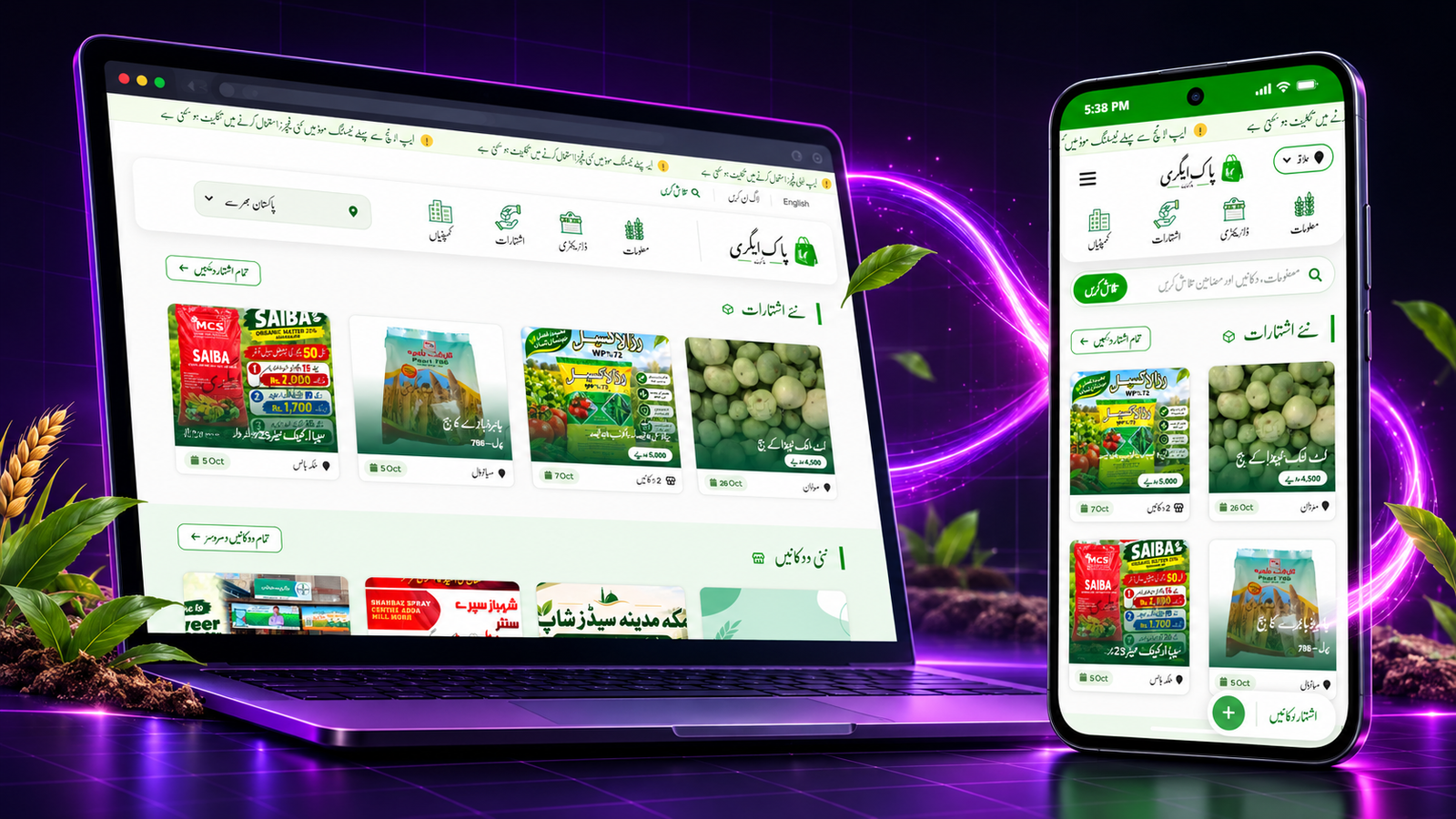
The Pak Agri Market agriculture marketplace app brings the existing marketplace to a branded Android home-screen entry point while keeping listings on the original website.
At a glance
Starting point
Live multi-vendor agriculture marketplace
Build route
Website-to-app conversion with no native code
Delivery
Testable APK and AAB for Google Play submission
Extend the marketplace without creating a second platform.
Pak Agri Market already connected buyers, sellers and agriculture businesses through a web marketplace. A traditional native app would have meant a separate development project, duplicated content work and ongoing coordination between web and mobile teams. The practical goal was different: preserve the working website and make its experience easier to reach from an Android home screen.
One live website. One branded Android experience.
AppCrafto wrapped the existing Pak Agri Market experience in an app shell, while the website remained the source of truth. Product listings, marketplace updates and user journeys continue to come from the site—so the team can maintain content in one place.
01 · Add the URL
Pak Agri Market’s live website and app name were added to the AppCrafto workflow.
02 · Apply the identity
The app icon, splash screen, theme, loader and navigation behaviour were configured to match the marketplace.
03 · Build in the cloud
AppCrafto produced the Android package without a local development environment.
04 · Test and prepare
The APK supports device testing, while the AAB provides the format needed for Google Play submission.
The web experience, adapted for mobile use.
Branded identity
Custom icon, splash screen, colour theme and loading state.
Mobile controls
Pull-to-refresh, pinch zoom, text sizing and double-back exit.
Link handling
Rules for internal journeys and external links keep navigation predictable.
Offline feedback
A dedicated connection-error screen gives users a clearer recovery path.
Engagement ready
Support for OneSignal or Firebase enables push-notification workflows.
Publishing formats
APK for direct testing and AAB for Google Play preparation.
A faster route from marketplace website to Android app.
The project delivered a mobile app route without replacing Pak Agri Market’s existing platform. That reduces duplicated maintenance and gives the business a branded home-screen presence, while the live website continues to power catalogue and content updates.
One content source
Website updates flow into the app experience automatically.
Lower maintenance burden
No separate native catalogue or content workflow to manage.
Clear distribution path
Test privately with an APK and prepare an AAB for Google Play.
Agriculture marketplace app: testing and publishing
The agriculture marketplace app needs the same care as the website it displays. Test listing search, category browsing, seller details and contact actions on a real phone. A seller should be able to confirm whether a listing change has appeared without copying the content into a second catalogue.
Use sample buyer and seller accounts to check access boundaries. Confirm that required fields, images and validation messages remain usable on small screens. A connection-error screen can explain interrupted access; it does not provide offline listing submission or prove that an unfinished form has been saved.
Follow AppCrafto’s build workflow, then work through the app testing checklist. The APK and AAB guide explains testing and distribution files. An AAB is a submission format, not proof of store approval.
Review Google Play’s release guide before planning a wider release. Website content updates can generally flow into the app, while changes to the app identity, native settings or integrations may require a new build. Re-test marketplace journeys after major website updates.
Pak Agri Market keeps its marketplace content in one place while offering a branded Android access route. Compare current AppCrafto plans when planning a similar project.
Frequently asked questions
What is the Pak Agri Market agriculture marketplace app?
It is a branded Android app built around the existing agriculture marketplace so listings and content remain on one website.
Do sellers need to update a separate app catalogue?
The website remains the source for live marketplace content. Normal listing updates can generally appear through that source without maintaining a second app catalogue.
Do APK and AAB files guarantee Google Play approval?
No. An APK supports device testing or direct distribution, while an AAB is a Google Play submission format. Developer accounts, declarations, testing and store review still apply.
MORE CASE STUDIES
Explore another mobile direction

CASE STUDY · 6 MIN READ
Kaspar Consulting: a connected services website prepared for mobile
How a service-led Odoo and software consultancy can extend its existing website into a focused mobile experience without duplicating its content.

CASE STUDY · 6 MIN READ
QWQER Pakistan: delivery journeys designed for a mobile app
A mobile-first case study for QWQER Pakistan’s instant, same-day, next-day and bulk delivery journeys, with tracking and business order support.
START WITH YOUR WEBSITE
See what your website feels like inside an app.
Create a free Android test build, check the important journeys on a real device and choose a publishing plan when you are ready.